
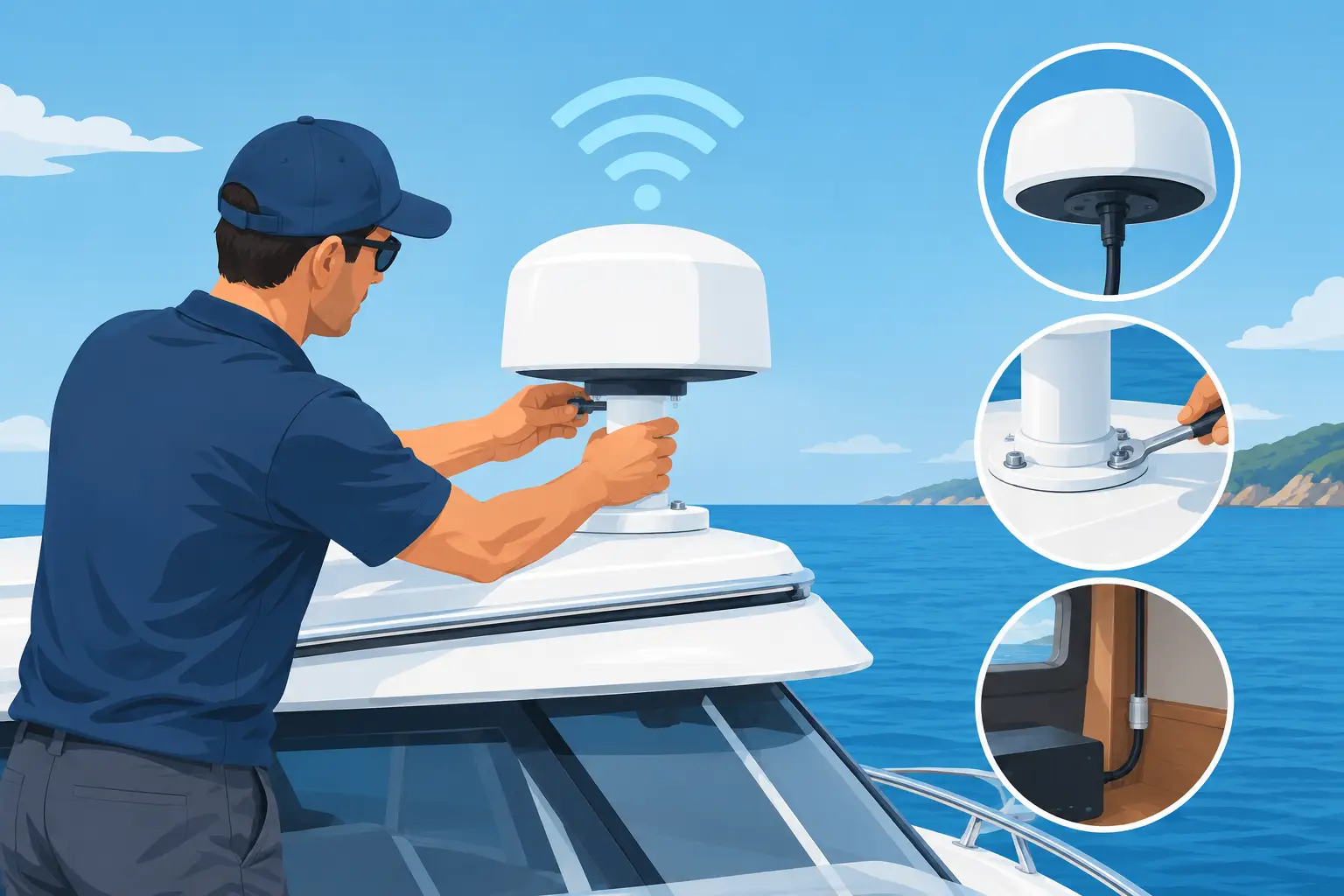
Steel superstructures, rotating radar arrays, exhaust stacks, salt spray, and long cable runs can turn a promising onboard network into a costly weak point. To install marine wifi antennas successfully, operators must treat the antenna as part of a complete communications system, not as a standalone accessory mounted at the highest available point. Correct placement, cable selection, grounding, and commissioning determine whether crews receive dependable coverage or intermittent connections when they need them most.
For ship managers, offshore operators, and industrial marine procurement teams, the commercial objective is clear: stable connectivity that supports operational communications, remote monitoring, crew access, security infrastructure, and data transfer without repeated service calls. A properly specified marine WiFi system reduces downtime, limits avoidable replacement costs, and gives technical teams a network they can manage with confidence.
Start With the Required Coverage and Connection Type
Before selecting a mounting location, define what the antenna must connect to. A vessel that needs onboard WiFi across accommodation spaces has a different requirement from a ship needing a high-gain link to a terminal, offshore platform, tug, or shore facility. The intended link distance, number of users, expected bandwidth, and physical obstructions all affect antenna type and installation method.
For broad local coverage, an omnidirectional antenna can distribute signal around the vessel. It is practical where users move throughout deck and accommodation areas, but it also receives interference from every direction. For a fixed point-to-point connection, a directional antenna concentrates energy toward a known endpoint. This normally delivers stronger performance over distance, provided alignment is accurate and the remote site remains within the antenna beam.
Do not specify an antenna by gain alone. Higher gain can improve reach, but it often narrows the vertical beam. On a vessel that rolls, pitches, or changes trim, an excessively narrow beam can cause the link to fade. The right selection depends on vessel movement, route profile, mounting height, and whether the connection is local, shore-based, or between marine assets.
Confirm Frequency Compatibility Before Installation
The antenna, wireless radio, access point, and any remote equipment must support the same operating frequency and connector standard. A mismatch may physically connect but will not deliver the expected radio performance. Procurement teams should also verify that the equipment is suitable for the relevant marine environment, including exposure to ultraviolet light, moisture, vibration, and salt-laden air.
For industrial sites and offshore facilities, frequency planning matters as much as hardware quality. Existing wireless networks, radar equipment, satellite systems, and metal structures can contribute to interference or signal reflection. A basic radio survey before installation is less expensive than relocating a completed installation after performance complaints begin.
Where to Install Marine WiFi Antennas for Best Results
The best antenna location is rarely chosen by height alone. A high mounting point can extend line of sight, but only when the antenna has a clear path and is not shadowed by steelwork, cranes, containers, masts, vents, or other equipment. The installation point should offer the clearest practical view of the intended coverage area while remaining accessible for inspection and service.
Keep the antenna away from major sources of electrical noise and moving metal equipment. Radar scanners, high-power transmitters, engine exhaust structures, and rotating assemblies can affect signal quality or create physical hazards. Follow equipment-specific separation requirements and vessel safety procedures rather than relying on a general distance rule.
Mounting brackets must be corrosion-resistant and rated for continuous vibration and wind loading. A lightweight bracket that performs well at a dock may loosen after repeated heavy-weather exposure. Use marine-grade hardware, locking fasteners, and a mounting surface capable of carrying the antenna and bracket load. Where dissimilar metals meet, use appropriate isolation practices to reduce galvanic corrosion.
The antenna should be installed in its intended polarization. A directional antenna mounted at the wrong angle can lose substantial signal strength even when it points toward the correct destination. Mark the alignment position during commissioning so engineers can quickly identify movement during later inspections.
Plan for Service Access
An antenna mounted where no technician can safely inspect it is not a finished installation. Leave enough access to check fittings, seals, cable glands, and bracket integrity. This is particularly relevant on offshore platforms and working vessels where maintenance windows may be limited by weather, operations, or permit requirements.
A practical installation also protects the equipment from direct impact, washdown exposure, and snagging during routine deck activity. The goal is not simply to place equipment out of sight. It is to position it where it can operate reliably and be maintained without creating unnecessary operational risk.
Cable, Grounding, and Weatherproofing Determine Long-Term Performance
Signal loss in the cable can erase the advantage gained by selecting a high-performance antenna. Keep coaxial cable runs as short as practical, especially at higher frequencies, and select low-loss cable rated for marine use. Avoid tight bends, crushed sections, unsupported cable runs, and unnecessary adapters. Every connection is a potential point of loss, water ingress, or failure.
Route the cable away from high-current power lines and sources of electrical interference whenever possible. Where a cable must pass through a bulkhead or enclosure, use correctly sized glands and sealing methods that preserve the vessel’s environmental protection requirements. Leave a controlled drip loop before entries exposed to rain or spray so water does not track directly into the enclosure.
Grounding and surge protection deserve the same attention as antenna placement. External antennas and elevated masts can be exposed to static buildup and electrical surge events. Install suitable surge protection at the point where the cable enters protected equipment areas, then bond and ground it in accordance with the equipment manufacturer’s instructions and the vessel’s electrical design. Grounding must be purposeful and properly integrated, not an improvised wire added after commissioning.
Weatherproof every external connector with the correct sealing materials and strain relief. Saltwater intrusion can cause intermittent faults that are difficult to diagnose because the network may appear normal until moisture or vibration affects the connection. A clean, properly sealed connector is a small installation detail with a major impact on lifecycle cost.
Configure the Network Before Final Alignment
Physical installation and network configuration must be completed as one controlled process. Before permanently securing the antenna position, confirm that the radio equipment has the correct operating mode, network address plan, security settings, channel allocation, and transmit power. An antenna cannot compensate for poor network configuration.
For point-to-point links, begin with a calculated alignment bearing, then refine it using the equipment’s received signal indicators and actual throughput tests. Do not stop at a strong signal reading. A reflected signal can look acceptable while producing unstable data performance. Test latency, packet loss, and sustained transfer rates under realistic network load.
For onboard WiFi coverage, validate performance in the locations that matter operationally. Test bridge-adjacent workspaces, machinery control areas, accommodation zones, external work decks, and any security or monitoring equipment relying on the network. Metal bulkheads and watertight doors can dramatically reduce indoor coverage, so additional access points may be more effective than trying to force a single antenna to serve every compartment.
Commission the Installation Against Measurable Standards
A serious marine installation should be documented and tested before handover. This protects the operator, supports future troubleshooting, and gives procurement teams evidence that the system meets the specified requirement. Record antenna model details, mounting location, cable route, grounding arrangement, configuration settings, alignment values, and test results.
At minimum, the commissioning record should confirm:
- Signal strength and signal quality at the intended endpoints
- Throughput, latency, and packet-loss results under normal load
- Weatherproofing, cable support, grounding, and surge protection checks
- Network security settings, administrator access, and configuration backup
Repeat testing after the vessel is underway when possible. Dockside conditions can hide reflections, interference, and movement-related issues that become apparent at sea. For offshore facilities, test under the normal operating conditions expected by the end user, not only during a quiet installation period.
Avoid the Installation Errors That Create Repeat Callouts
The most common failure is mounting an antenna where it is convenient instead of where it has a clear radio path. Other recurring problems include using unsuitable cable, leaving exposed connectors unsealed, failing to protect against surges, and selecting high-gain equipment without accounting for vessel motion. These issues often produce intermittent faults, which consume far more engineering time than a visible hardware failure.
Another mistake is treating coverage as the only performance measure. A network can show full signal bars and still fail to support reliable operational traffic. Capacity, interference, channel planning, and wired backhaul all influence the user experience. Where a marine WiFi system supports mission-critical monitoring or communications, specify performance targets rather than accepting vague coverage claims.
Revlight Security supports buyers who need dependable marine network infrastructure built around real operating conditions. The right system should be selected for the vessel, the route, the coverage requirement, and the consequences of a communications failure.
A disciplined installation now prevents expensive troubleshooting later. Specify the link objective, protect every connection, verify performance under load, and leave a clear service record for the next engineer who steps aboard.
🛡️ Secure Your Home or Business Today
Protect your home, office, shop, or business with reliable CCTV security cameras. Explore our range of CCTV cameras and find the right security solution for your needs.
Explore CCTV Cameras ✉️ Email Us



 Singapore :
+65-6708-9302
Singapore :
+65-6708-9302